
AI agents that read your documentation cannot tell an approved standard from an old draft or an informal note. Authority labels let your team say which is which. You define a short list of classes, such as standard, guideline, and example, and you write a definition for each one. Then you assign classes to libraries, or to paths inside a library. Each result with a class shows that class, and the response defines each class that appears.
Only admins set classes. No model assigns or changes a class, and the reranking model never sees classes. Agents see the class names and definitions in results. Authority never grants access to a library.
Enable authority labels#
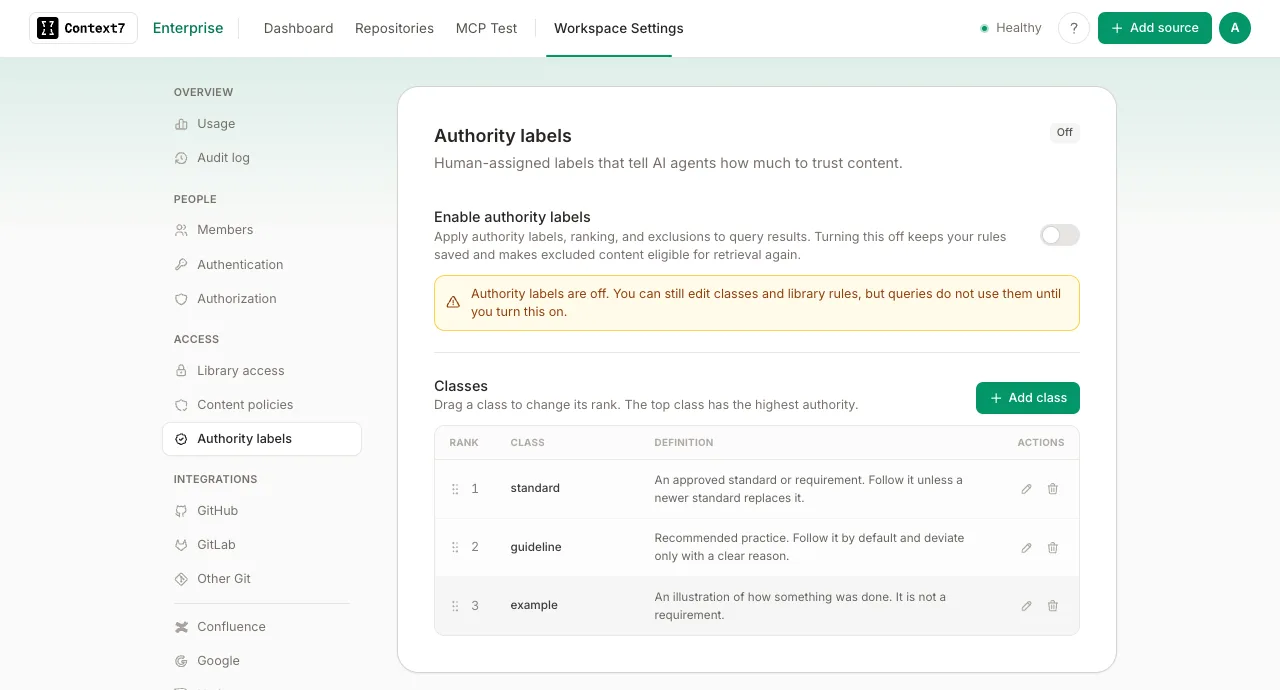
Authority labels are off by default. Open Workspace Settings, select Authority labels under Access, and turn on Enable authority labels. Labels, ordering, and exclusions then apply to every query through the MCP server, the API, and the dashboard snippet search.
You can prepare classes and rules while the feature is off, in the dashboard or in the GitOps manifest. Rules that are saved while the feature is off do not change any result.
When you turn the feature off, Context7 keeps your classes and rules. Content that your exclusion rules hide becomes eligible for retrieval again, and library access control still decides who can query each library. If exclusion rules exist, the dashboard asks you to confirm first. The audit log records each change to this setting.
Define the classes#
Open Workspace Settings and select Authority labels under Access. The classes are on the same card as the Enable authority labels switch. While the feature is off, the card marks it as off, and you can still edit the classes. A new instance starts with three classes:
| Class | Default definition |
|---|---|
standard | An approved standard or requirement. Follow it unless a newer standard replaces it. |
guideline | Recommended practice. Follow it by default and deviate only with a clear reason. |
example | An illustration of how something was done. It is not a requirement. |
You can rename a class, change its definition, add a class, and remove a class. The order of the list is the order of authority: the top class is the most authoritative. To change the order, drag a class by its handle. With a keyboard, focus the handle and press the up or down arrow key.
You cannot remove a class that a library rule still uses. Change or delete those rules first.
Assign classes to a library#
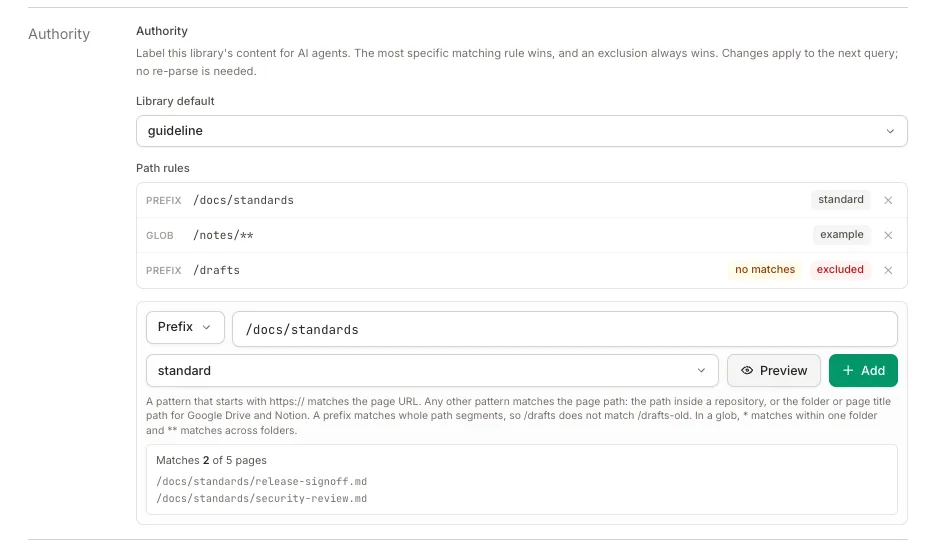
Open the library, click Settings, and find the Authority section. When authority labels are off for the workspace, the section shows a notice: you can still edit and save rules, but they do not apply.
- Library default: the class for all content in the library, or Excluded to hide the whole library.
- Path rules: a class for part of the library, or an exclusion. A rule is a Prefix or a Glob.
Click Preview to see which pages a rule matches before you add it. A saved rule that matches no indexed page shows a no matches badge. To add a path rule, click Add, then click Save changes. Context7 saves the whole set of rules together in one request, so a new or changed rule applies only after you click Save changes.
What a rule matches#
A pattern that starts with https:// or http:// matches the page URL, the same link that appears on the Source: line of a result. For Confluence, this is the link that opens the page in your browser. Any other pattern matches the page path:
| Source | Page path |
|---|---|
| Git repository | The path inside the repository, for example /docs/standards/release.md |
| Website, Confluence, llms.txt, OpenAPI | The path of the page URL, for example /wiki/spaces/QA/pages/123 |
| Google Drive | The Drive folder path and file name, for example /QA/Standards/Release sign-off. A slide uses the path of its presentation. |
| Notion | The title path of the page inside the selected pages and databases, for example /QA Handbook/Standards/Release sign-off. A / in a page title becomes /. |
The path of a page URL includes its query string, if it has one.
A path pattern without a leading / gets one, so standards/ and /standards/ are the same rule.
A prefix matches whole path segments. /drafts matches /drafts and /drafts/plan, but not /drafts-old/plan. In a URL pattern, a ? or # after the prefix also ends the segment. To match the start of a file or folder name, use a glob, for example /drafts*/**.
Google Drive and Notion paths come from folder names and page titles. When someone renames or moves a page or folder, its path changes, and a rule can stop matching it. This applies to exclusions too. Check for the no matches badge after you reorganize content, and prefer a URL rule when a page must keep its label.
In a glob, * matches any characters inside one folder, ** matches any characters across folders, and ? matches one character. A glob must match the whole path. For example, /qa/**/checklist-*.md matches /qa/release/checklist-launch.md.
Which rule wins#
When more than one rule matches a page, Context7 applies them in this order:
- An exclusion always wins. If any exclusion matches the page, including a library exclusion, the page is excluded.
- The most specific class rule wins. Specificity is the number of literal characters in the pattern. A longer prefix is more specific than a shorter one. For a glob,
*and?do not count. Specificity counts the whole pattern, so a URL pattern, which includes the host, usually beats a path pattern. If two rules have the same specificity, a prefix wins over a glob, and then the older rule wins. - The library default applies when no path rule matches.
- The page has no class when no rule matches and the library has no default.
For example, with these rules on one library:
| Rule | Class |
|---|---|
| Library default | guideline |
Prefix /standards/ | standard |
Prefix /standards/drafts/ | Excluded |
/standards/release.md is a standard, /guides/testing.md is a guideline, and /standards/drafts/new.md never appears in results.
Exclude content#
An excluded page or library never appears in results, through the MCP server or the API. A library excluded as a whole also disappears from library search, and a documentation request for it returns the same “not found” response as a library that is not indexed.
Exclusions apply to content that is already indexed. You do not need to re-index or delete the library.
Changes apply at once#
Context7 resolves classes when it answers a query, not when it indexes content. A change to a class, a definition, or a rule applies to the next query. You do not need to refresh the library.
How authority changes the order of results#
Authority only reorders results that are already relevant to the query. It never adds a result, and it never moves a weakly related result above a clearly more relevant one.
- With reranking on, Context7 reorders only the results that the reranking language model selected as relevant. The other results stay below them.
- With a decision model for reranking, the model ranks every result, so authority does not change that order. Results still show their labels, and exclusions still apply.
- With reranking off, a result can move ahead of another only when their relevance scores differ by at most 0.02. The same rule applies when reranking fails or has too few candidates.
The 0.02 band is fixed. It was measured on text-embedding-3-small, where it lets authority swap near-ties but does not move a result past a clear drop in relevance. Other embedding models spread their scores differently, so the same band can swap fewer or more results with them.
Within those limits, a more authoritative class comes first, and content without a class comes after all classes. Results with the same class keep their original order. When no rules exist, the order does not change.
What agents receive#
The response from query-docs and from GET /v2/context starts with a legend that defines each class that appears in the results. Each labeled result has an Authority: line, and each result that has a source URL has a Source: line with that link.
A result without a class has no Authority: line. The legend lists only the classes that appear, so definitions are not repeated for each result.
The snippet search in the dashboard (GET /api/projects/{library}/search) returns the same information as JSON. Each result in codeSnippets and infoSnippets has a sourceUrl and an authority field. The example shows one entry of codeSnippets, with some fields left out. It is not a full response:
authority is null for a result without a class. For an excluded library, the response has excluded: true and empty codeSnippets and infoSnippets lists.
Audit log#
Every change to a class, the class order, a rule, or the Enable authority labels setting is written to the audit log with the admin who made it. Open Workspace Settings, select Audit log under Overview, and filter by Authority class, Class removed, Class order, Authority rules, or Authority labels.
Who can change labels#
Only admins can view and change classes and rules. Everyone who can query a library sees its labels in results, including anonymous MCP and API callers when MCP authentication is not required. Library access control still decides who can query each library.